Kwai - Video & Drama
- 4.0
- Rating
- 500.00M
- Installs
- Free
- Price

 Analysis by App-foxy
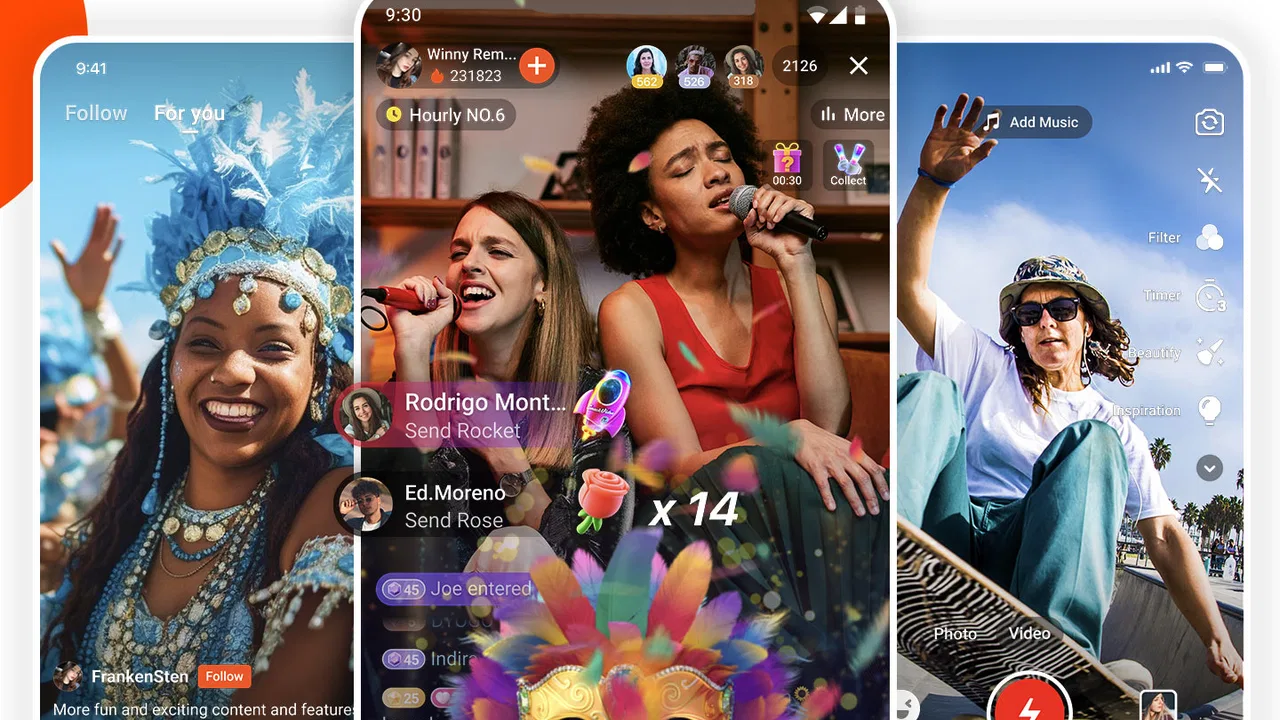
I approached Kwai as a short-video app first, but it quickly felt broader than a simple scrolling feed. It combines video editing, live streams, shopping-oriented trend discovery and social interaction in one place. My overall view is clear: it is a lively choice for people who enjoy discovering quick, informal videos and participating in a busy community, but it is less suitable if you want a quiet, tightly curated viewing experience or a dedicated editing tool with a very focused workflow.
The app is free to install, and its Teen content rating makes it aimed at an older audience rather than very young children. Joyo Technology Pte Ltd develops it, and the Android release works from version 5.0 onward. It has been available since March 2, 2018, and the current version is 13.1.10.543603. Those details matter because Kwai is not a new experiment with an untested audience: it has grown into a large social video platform with over 500 million installs and a 4.0 average from around 11 million ratings.
How Kwai feels in everyday use
The first thing I noticed is the app’s fast rhythm. Videos arrive in a continuous stream, so it is easy to open Kwai for a short break and remain there longer than planned. The material feels designed for quick reactions: short jokes, casual performances, visual tricks, daily-life clips and trend-driven posts are easier to consume than long explanations. I found that the variety is part of the appeal, although it also means the quality can change sharply from one clip to the next.
In-Depth Coverage of Kwai - Video & Drama
Rather than treating the feed as a passive television channel, Kwai encourages a more active social habit. I can watch, react, follow creators, join conversations and move toward live content without leaving the same general ecosystem. That makes it useful when I want entertainment and interaction together. It is not merely an editor with a social button added at the end; the community side shapes how the whole app feels.
The strongest case for using it is discovery. If I enjoy seeing what people are making right now, Kwai gives me a broad stream of short-form material without requiring a carefully planned search. The trade-off is that discovery can become noisy. A person who prefers to choose a specific subject, watch longer videos or avoid trend-focused content may find the constant movement tiring.
Editing is useful when speed matters more than precision
Kwai’s editing side is most appealing for quick posts. I can think of it as a practical bridge between recording something on my phone and sharing it socially, rather than as a replacement for a full desktop editor. That distinction is important. For a spontaneous clip, the convenience of staying inside one app is valuable. I do not need to export a finished project from a separate program before entering the social environment where I want people to see it.
My preferred workflow is to decide the purpose of the video before opening the editor. If the goal is a short reaction, a simple daily moment or a trend response, I can keep the process direct and avoid spending too much time polishing footage that is meant to be immediate. If the video needs careful timing, detailed sound work or a more controlled visual style, I would use a dedicated editor first and treat Kwai as the publishing destination.
A useful habit is to prepare the clip with the viewing context in mind. Short-video audiences make quick decisions, so the opening moment matters more than a long introduction. I would trim hesitation at the beginning, keep the central action easy to understand and check the result before posting. This is not a glamorous advanced trick, but it makes a noticeable difference when the app is used for everyday sharing rather than random uploads.
Live streams change the pace of the experience
Live streams are where Kwai feels most different from a basic edited-video feed. Recorded clips are quick and disposable, while live content asks me to spend more time with a creator or event as it unfolds. That can create a stronger sense of presence, especially when I want conversation rather than a sequence of polished snippets.
The downside is that live content is less predictable. A short video can be skipped immediately if it does not interest me, but a live session may take longer to understand. I would recommend entering live streams with a clear reason, such as following a creator I already enjoy or looking for a particular kind of interaction. Otherwise, the transition from casual scrolling to live viewing can make the app feel unfocused.
Users should also remember that live participation is more social than ordinary viewing. Comments and reactions can make the experience enjoyable, but they can also add pressure to keep up with a fast-moving conversation. People who prefer watching quietly may find standard clips more comfortable than live rooms.
Shopping and trends are useful, but they add commercial noise
The shopping and trend elements give Kwai a practical discovery angle. I can encounter products, styles and popular ideas while browsing entertainment, which is convenient when I am already curious about what people are discussing or using. It turns the app into more than a place to watch videos; it becomes a window into what is attracting attention inside its community.
However, this combination requires a little discipline. Entertainment can make a product feel appealing before I have considered whether I actually need it. My advice is to separate inspiration from buying: save the idea mentally, compare it elsewhere when appropriate and avoid treating a popular clip as proof that something is right for me. The most important trade-off is that discovery and promotion share the same space.
You May Also Like

 Blood Strike: 2.5 Anniversary
Blood Strike’s Loadouts Turn Every Drop Into a Tactical Gamble
A close look at Blood Strike’s custom loadouts: how fast access to signature weapons reshapes its battle royale rhythm, rewards preparation, and narrows the gap between fights.

 Pandora - Music & Podcasts
Pandora’s Music Is Easy to Start, but Harder to Recover
Pandora’s strength is its low-effort path from a seed to a station. Its weak spot is how much confidence it asks you to place in connection, setup, and quiet recovery.

 8 Ball Pool
8 Ball Pool Is Built on Rivalries, Rematches, and Routine
A close look at the rivalries, rematches, shared routines, and unanswered safety questions that turn a quick pool match into a persistent mobile community.

 Samsung Music
Samsung Music’s Quiet Strength Is Playing What You Already Own
Its reach comes less from spectacle than from dependable access to a personal library. That simplicity is both the app’s strongest retention engine and its ceiling.

 AccuWeather: Weather Radar
AccuWeather Review: A Quick, Clear Forecast for Everyday Decisions
For everyday plans, the best forecast is the one you can understand quickly. AccuWeather makes rain timing, radar, and local conditions easy to act on, with a few trade-offs.

 Hill Climb Racing
Why Hill Climb Racing Still Turns Crashes Into One More Run
A tiny car, a bumpy hill and one more upgrade: Hill Climb Racing keeps resurfacing because its simple chaos makes every near-miss feel personal.
More From Our News Desk



This is also why Kwai may not suit someone who wants a purely creative feed. If I open an app only to watch independent video work without shopping prompts or trend-led material, a specialist video community may feel calmer and more focused.
Social interaction is central, not optional decoration
Kwai works best when I treat it as a community rather than a private media player. Following people whose style I genuinely enjoy improves the experience, because a familiar group of creators gives the feed more identity. If I simply scroll without shaping what I see, the app can become a blur of unrelated clips and repeated trends.
I also recommend being selective about engagement. A quick reaction can influence what appears later, so interacting thoughtfully is more useful than responding to everything. If a particular type of video is not appealing, skipping it consistently is a better long-term habit than watching it out of curiosity and then complaining that similar material keeps returning.
For creators, the social setting is both an advantage and a challenge. Posting inside a busy community can make sharing feel immediate, but it also means a video has to compete for attention. I would use Kwai for informal, frequent publishing rather than expecting every upload to receive a carefully measured audience response.
What the large audience tells me—and what it does not
Kwai has around 8.8 thousand written reviews alongside its much larger rating total, and the app holds a 4.0 average. I read that as evidence of a broadly useful product with noticeable differences in personal experience. A platform built around changing feeds, live content and social interaction will not feel identical to everyone, so the average is best treated as a general signal rather than a guarantee.
The scale is reassuring for someone who wants an active service rather than an empty network. With over 500 million installs, the app clearly has reach and a substantial audience. Still, popularity does not automatically mean that its style will match my habits. A large community can bring more creators and more discovery, but it can also bring more repetition, more distractions and a wider range of content quality.
The limitations I would consider before installing
My main criticism is the lack of calm. Kwai is built around movement: new clips, social reactions, live sessions, trends and commercially relevant discoveries. That energy is exactly what attracts many users, yet it can make the app feel demanding when I only want one specific task completed.
The editing tools are another point of compromise. They are convenient because they sit close to the publishing experience, but convenience is not the same as deep control. Someone producing polished work with exact cuts, layered audio or a carefully managed project structure will probably be happier in a dedicated video editor. Kwai is strongest when the video is short, timely and intended for social viewing.
There is also a question of attention. The feed makes it easy to move from one clip to another, and the addition of live streams and shopping trends creates several reasons to keep browsing. I would not call that a flaw unique to this app, but it is a real part of the experience. If I want to use Kwai without losing an entire evening, I need to open it with a defined purpose: watch a few creators, check a live session or prepare one post, then leave.
The Teen rating should also guide families. I would not treat the app as a children’s entertainment space simply because individual videos may look harmless. Social feeds change quickly, and older-teen suitability is a more sensible expectation than unrestricted access for young children. Parents deciding whether it belongs on a shared device should consider the social and live aspects, not only the editing function.
Who will get the most from Kwai
I think Kwai is a strong fit for people who enjoy short videos as a social routine. It suits someone who likes discovering unfamiliar creators, reacting to quick clips, dropping into live streams and keeping an eye on trends without switching among several services. It is also useful for casual creators who want to record, edit and publish from the same mobile environment.
It can work particularly well in an everyday situation such as a commute or lunch break. I might open the app to watch updates from a few followed creators, notice a trend that gives me an idea for a short clip and then edit a simple response before returning to work. That whole loop feels natural because watching, making and interacting are connected. The same workflow would be less attractive if I needed a polished promotional video or a quiet research session.
People who should skip it are those who dislike algorithmic discovery, live social spaces or shopping mixed into entertainment. I would also point a serious video maker toward a focused editing app for production and use Kwai only if the final audience is active there. Likewise, someone seeking long-form viewing should choose a platform designed around full-length programming instead of expecting a short-video feed to provide the same depth.
How it compares with familiar alternatives
Compared with a dedicated video editor, Kwai wins on the distance between creation and sharing. I can make something quickly and place it in a social environment without building a separate publishing routine. The dedicated editor wins when I need precision, organization and a more deliberate finish.
Compared with a standard short-video social network, Kwai’s mix of editing, live participation, trend discovery and shopping gives it a wider personality. That breadth can be a reason to choose it, especially if I want several activities in one place. It can also be the reason to avoid it if I prefer a narrower service with fewer competing distractions.
Compared with a live-streaming-first platform, Kwai feels easier to enter casually because short clips provide a quick starting point. A live-focused alternative may be better for someone whose priority is long conversations, regular broadcasts or a stronger sense of scheduled community. Kwai is more flexible, but its flexibility can make the overall experience feel less specialized.
Costs, updates and practical expectations
The app itself is free, which makes trying it straightforward. Optional in-app purchases range from $0.99 to $114.99 per item, so I would check carefully before confirming any purchase and keep the free experience separate from paid extras in my mind. The broad price range is a reminder that “free to install” does not mean every part of the surrounding experience has the same cost.
Because the application is updated over time, the exact feel of menus and workflows can change. I would not judge it solely by one early session. The current Android version is 13.1.10.543603, and support beginning with Android 5.0 makes it accessible to many older devices. Even so, a user with an aging phone should keep expectations realistic when handling video feeds, editing and live content together; a newer device will generally make a media-heavy app more comfortable to use.
Before committing to regular posting, I would spend a few sessions learning the feed and deciding whether its community matches my interests. That small test answers more than the install count can. The important question is not whether Kwai has a large audience, but whether I enjoy the way it combines entertainment, creation and conversation.
My final recommendation
Kwai is best understood as a social short-video hub with editing built into the experience, not as a professional editor that happens to host a feed. I like its immediacy, its mixture of recorded and live content, and the way a casual viewer can become a creator without leaving the app. Its large audience gives discovery real momentum, while its free entry makes experimentation easy.
My reservations are equally clear. The feed can be noisy, commercial content may sit close to entertainment, live interaction is not for everyone and the editing side will not satisfy users who need detailed production control. I would recommend it to teens and adults who enjoy active short-form communities and want a quick path from idea to post. I would skip it in favor of a dedicated editor, long-form video service or quieter social platform if those are my priorities.
After using it with that expectation, my verdict is positive but specific: Kwai is worth trying for social discovery and fast mobile publishing, provided I shape my feed, watch my time and treat trend-driven shopping with a critical eye. It is energetic rather than refined, broad rather than specialized, and most rewarding when I want to participate instead of simply press play.
FAQs for Kwai - Video & Drama
01What is Kwai and how does it work?
Kwai is a social media app that allows users to create, edit, and share short videos with a variety of effects, filters, and music. It focuses on engaging content, user interactions, and fun challenges. Users can browse trending videos, follow creators, and participate in community events. Kwai is available for both Android and iOS platforms.
02Is Kwai free to use, and are there any in-app purchases?
Kwai is free to download and use, offering a wide array of features at no cost. However, the app includes optional in-app purchases that provide access to premium features and exclusive content. These purchases are not necessary for the basic functions, but they allow users to enhance their experience with additional tools and effects.
03What privacy measures does Kwai implement?
Kwai takes privacy seriously by implementing several measures to protect user data. Users have control over their privacy settings, allowing them to choose who can view their content and interact with them. Kwai also complies with data protection regulations and employs encryption to safeguard personal information and ensure a secure user experience.
04What are the device requirements for installing Kwai?
To install Kwai, your device must meet certain requirements. For Android users, the app requires Android version 5.0 or higher. For iOS users, iOS version 10.0 or later is necessary. Additionally, a stable internet connection is recommended for smooth video playback and uploading. Ensure your device has enough storage space before downloading.
05Can I use Kwai to earn money or rewards?
Yes, Kwai offers various opportunities for users to earn money and rewards through its creator program. By producing popular content and gaining followers, users can participate in monetization initiatives. Kwai often runs contests and challenges that offer prizes, providing additional avenues for creators to earn within the app.
Pros
- User-friendly interface with easy navigation.
- Wide variety of filters and effects.
- Fast video upload and sharing capabilities.
- Engaging community with interactive features.
- Regular updates keep content fresh.
Cons
- Contains frequent in-app advertisements.
- Limited editing tools compared to competitors.
- Some features require a stable internet connection.
- Occasional glitches in video playback.
- Privacy settings can be confusing for new users.

Kwai - Video & Drama
Gallery